


WPSpeedPlaybook
WPSpeedPlaybook — The Field Manual for Fast WordPress (PDF, 367 Pages)
WPSpeedPlaybook — The Field Manual for Fast WordPress (PDF, 367 Pages)
Couldn't load pickup availability
367 Pages of Proven, Technical, Real-World Optimization Strategies
Unlock the complete system for turning any WordPress website — even bloated sites built with Elementor, Bricks, Divi, Oxygen, WooCommerce, or custom themes — into a high-speed, stable, conversion-optimized machine.
This isn’t theory.
This isn’t surface-level “install this plugin” advice.
This is a step-by-step technical manual compiled from real optimization work, detailed speed test breakdowns, case studies, and deep-dive diagnostics across hundreds of WordPress installations.
Whether you're an agency, freelancer, developer, or a serious DIY site owner, the WP Speed Playbook shows you exactly how to diagnose, fix, and permanently improve your site’s performance.
Why This Guide Exists
Slow websites cost money.
According to the business impact analyses referenced throughout the guide — including Google Web Vitals case studies, Deloitte research, and independent performance audits — slow load times reduce:
- Conversions
- SEO rankings
- Session duration
- Customer trust
- Revenue
Just shaving milliseconds off page load time can dramatically improve sales and retention. This guide shows you exactly how to do that.
Everything is based on mobile-first performance, because Google exclusively uses mobile metrics for ranking — and because even a fast desktop site can be 6x slower on mobile.
What Makes This Guide Different
Most “speed optimization” content online is simplistic, outdated, or incomplete.
This playbook is:
✔ 100% Technical — No Fluff
Every optimization includes explanations, step-by-step instructions, waterfall analysis, and diagnostic reasoning.
✔ Based on Real PageSpeed Insights Mechanics
You learn exactly how Google measures performance (TTFB, CLS, LCP, FCP, Blocking Time, Speed Index) — and how to fix each one.
✔ Full Coverage: Hosting → Server → DNS → Images → JS → CSS → Plugins → Caching → Security
The guide covers every level of optimization, from infrastructure to front-end refinement.
✔ Optimization That Works With Any Page Builder
Elementor, Divi, Bricks, Oxygen, Gutenberg, WooCommerce — everything is addressed in detail with practical solutions.
✔ Includes Real Case Studies
From ThemeIsle to Elementor.com — full waterfall breakdowns showing exactly what they’re doing wrong and how to fix similar issues in your own site.
✔ Hundreds of Tools, Plugins & Recommended Workflows
Including:
- DebugBear
- ByteCheck
- GTMetrix
- Lighthouse CI
- SiteSpeed.io
- FlyingPress
- Asset Cleanup
- Cloudflare configs
- Firewall setups
- Image optimization software
- And more
What You’ll Learn
✓ How to Analyze Speed Tests Properly
Pagespeed Insights is not enough — you’ll learn how to use DebugBear, waterfall charts, and multi-test averages for real diagnostic accuracy.
✓ Why Mobile Scores Are the Only Ones That Matter
Google ranks exclusively on mobile — and mobile hardware & bandwidth create unique bottlenecks that this guide teaches you to fix.
✓ How to Achieve Ideal Scores (90–100 Mobile)
The exact steps to reach perfect Core Web Vitals on nearly any site, even on complex WooCommerce setups and heavy page builders.
✓ How to Reduce Page Weight to 500 KB or Less
Techniques for shrinking CSS, JS, images, HTML, and removing unnecessary DOM bloat.
✓ Mastery of TTFB (Time to First Byte)
Breakdown of all six components of TTFB (DNS, Connect, SSL, Send, Wait, Receive) and how to fix each one at the hosting, server, CDN, and WP levels.
✓ How to Optimize JavaScript
Delay, defer, async, unload — with examples of which files break when delayed and how to test safely.
✓ Image Optimization Deep-Dives
Format choice (AVIF, WebP), compression, lazy loading, responsive sizing, and manual vs automated workflows.
✓ Caching Done Right
How WordPress caching plugins interact with server-level caching, how to configure them together, and how to avoid the most common mistakes.
✓ Security Without Slowing Down Your Site
Firewalls, login protection, malware removal, and how to balance security with performance (Wordfence vs lightweight alternatives).
✓ Database Optimization
Autoload reduction, query optimization, MySQL tuning, and backend bottleneck elimination.
✓ Competitor Performance Analysis Tools
How to compare your site to others and identify opportunities for improvement.
Table of Contents
Below is a structured and complete TOC reflecting the content found across the 367-page document.
SECTION I — Foundations of WordPress Performance
- Pagespeed’s Business Impact
- Why Mobile Performance Is All That Matters
- Why Test Scores Vary
- Understanding Core Web Vitals
- Lab Data vs Field Data
- Common Misconceptions About Performance
SECTION II — Speed Testing & Interpretation
- Pagespeed Insights Deep Dive
- DebugBear for Mobile Diagnostics
- GTMetrix Waterfall Analysis
- Chrome DevTools Network Tab
- Multi-test Averages & Variance
- Ideal Performance Benchmarks
- Continuous Performance Monitoring Tools
SECTION III — TTFB (Time to First Byte) Mastery
- The Six Components of TTFB
- DNS Optimization
- SSL/TLS Optimization
- TCP Optimization
- HTTP/2 & HTTP/3 Adoption
- Connection Handling & Server Configs
- Diagnosing High TTFB Using ByteCheck
SECTION IV — Asset Optimization (CSS, JS, Images)
- How to Identify Heavy Assets
- Reducing Requests & Page Weight
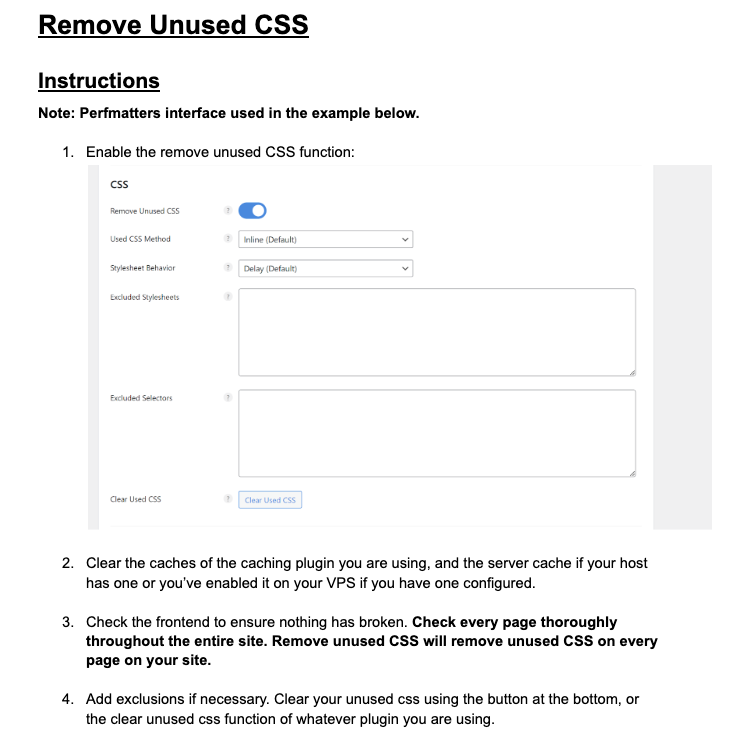
- CSS Removal & Critical CSS
- JavaScript: Delay, Defer, Async, Unloading
- Image Optimization (Manual & Plugin Workflows)
- Next-Gen Formats (AVIF/WebP)
- Lazy Loading Strategies
- HTML Document Weight Reduction
- DOM Size & Layout Stability
SECTION V — WordPress-Level Optimization
- Plugin Audits & Asset Cleanup
- Page Builder Optimization (Elementor, Bricks, Oxygen, Divi, Gutenberg)
- Caching Plugins (FlyingPress, WP Rocket, W3 Total Cache)
- Cache Warming
- WooCommerce-Specific Optimization
- Database Optimization
SECTION VI — Server & Hosting Optimization
- VPS Optimization
- NGINX/Apache Configuration
- PHP Optimization
- MySQL/MariaDB Tuning
- Browser Caching, Gzip, Brotli
- CDN Setup (Cloudflare, others)
SECTION VII — Security Without Sacrificing Speed
- Firewalls (7G/8G, Cloudflare WAF, BunkerWeb)
- Brute Force Protection
- Disabling XML-RPC
- Malware Detection & PHP Error Debugging
- Security Plugin Evaluation (Wordfence, Ninja Firewall)
SECTION VIII — Diagnostic Case Studies
- ThemeIsle Case Study
- Elementor.com Deep Analysis
- Full Waterfall Breakdown
- What They’re Doing Wrong
- How to Fix Similar Issues on Your Site
SECTION IX — Tools & Resources
- Best Free Tools
- Premium Tools (Optional)
- Self-Hosted Monitoring Tools (Lighthouse CI, SiteSpeed.io)
- Competitor Analysis Tools
What’s Included
- 367-page PDF
- Fully detailed images, screenshots & waterfall charts
- Diagnostic frameworks for recurring use
- Step-by-step mobile optimization workflow
- Complete plugin, server, and CDN configuration reference
- Lifetime access to the guide PDF (future editions included)
- Instant Access
- Fast Results
- Happy Clients


Customer Reviews
-
★★★★★
Clear and practical!
Finally understood what was slowing my site down. The steps were easy to follow and my mobile score improved within a weekend.
Daniel K. -
★★★★★
Great for client projects
I use this workflow on every build now. Straightforward, no fluff, and saves me hours.
Marissa T. -
★★★★★
Helped my store feel faster
Didn’t need to change themes—just applied the guide and my WooCommerce pages load noticeably quicker.
Evan R.